Author by : Doublehorn
DAFTAR ISI
Protected by Copyscape Online Infringement Detector
aboutus website design services

Willkommen auf mein web blog

Best regard. I will do my best to make it interesting and useful. Greeting to toko online Prestashop!
Tampilkan postingan dengan label Internet-Download-Manager. Tampilkan semua postingan

25 Januari 2013

Solusi Fake SN Internet Download Manager| website file

IDM has been registered with a fake SN | website archive

S aya akan sharing di blog blogger saya trik mengatasi Internet Download Manager yang memunculkan pesan error :

Fake Serial Number

Pertama saya mengalami pada tanggal 26 –12–2011. Saat itu muncul tawaran Update IDM. Biasanya ini saya abaikan (klik NO). (Terus terang saja!! Software andalan ini saya dapatkan secara gratis dari internet). Tetapi entah mengapa? Kali ini saya tergoda tawaran tersebut dengan menekan tombol OK. Setelah download file kelengkapan untuk Update IDM, seharusnya diikuti proses reinstall, tetapi ternyata muncul Notasi Peringatan ini

fake serial number internet download manager

Ketika di klik OK, saya harus mengisi Prompted form. OK. jangan diisi dulu form tersebut.

Tips kali ini akan memberi tutorial mengatasi Serial Number IDM kena blok (Fake serial number). Caranya mudah dan berbeda dengan cara sebelumnya dalam mengatasi hal yang sama.

Dulu yang saya lakukan adalah melakukan unistall IDM, kemudian reinstall IDM dan memasukkan Serial Number. Butuh banyak waktu dan kemungkinan GAGAL karena Serial Number yang dimaksud sudah tidak bisa dipakai lagi atau ada file yang terkait dengan IDM lama yang belum dihapus karena belum menghapus Cache atau semacamnya.

Mengatasi IDM kena blokir - website files

Lakukan langkah-langkah mudah dibawah ini :

  1. Buka C:\WINDOWS\system32\drivers\etc , Terlihat file host. Silahkan klik kanan dan Open with Notepad
  2. Setelah terbuka silahkan tambahkan daftar dibawah ini,  letakkan tepat dibawah kata 127.0.0.1 local host

  3. Disimpan (klik SAVE)
  4. Klik kanan pada file host dan pilih properties, Centang Read only dan klik OK
  5. Matikan koneksi internet Anda
  6. Silahkan buka Internet Download Manager
  7. Jika masih muncul form box seperti diatas, isikan saja data (boleh diisi sembarangan untuk first name, last name dan email address, yang penting Anda jangan lupa Serial Number).

Jika lupa Serial Number, gunakan saja serial number pada list ini (pilih salah satu) :
  • EC0Q6-QN7UH-5S3JB-YZMEK
    GZLJY-X50S3-0S20D-NFRF9
Setelah semua data diisi, akan hilang dengan sendirinya. IDM pun bisa digunakan kembali.


That's all we know - Happy blog blogger

read more website design

11 Desember 2012

IDM : Solusi Download Terputus di Mediafire | website files


Apakah Anda maniak pemburu free material download, maka tidak salah memilih software downloader Internet Download Manager (IDM) yang handal. Untuk memastikan kehandalannya silahkan memilih downloader berbayar seperti Internet Download Manager terbaru atau yang selalu di-update.

Namun jika Anda tetap menginginkan yang gratis – itu juga bisa. Banyak situs yang memberi layanan file sharing. baik berbayar dan harus login ataupun FREE untuk mendapatkan Serial Number IDM terbaru. Hanya saja Anda perlu sabar, cermat dan ulet mencari di Google karena bagi pemburu download gratisan (sebelum benar-benar dilarang), tentu tidak semuanya berjalan lancar.

Berburu Downloader handal : Pilih IDM - arsip website

Namanya juga gratisan, kadang kita mengalami masalah tidak terduga, seperti download lambat, download terputus-putus meskipun masih bisa di-RESUME. Atau bahkan sama sekali tidak dapat di-RESUME. Bila file size kecil (kurang dari 10 MB)  boleh jadi “No-Problem” – hanya perlu download ulang. Tetapi akan fatal jika ukuran file ratusan MB atau diatas 1GB. Alamak! Capek deh!!! Jika harus mengulang terus, apalagi jika speed software downloader sangat lambat.
gagal resume Internet Download Manager

Diantara banyak situs file sharing seperti Rapidshare, Megaupload dan masih banyak lagi, pilihan favorit saya adalah download via Mediafire. Tapi saat download di Mediafire pernahkah Anda mengalami problem terputus (tidak bisa di resume)??? Jika pernah, Anda perlu mencoba tips berikut ini.

Tetapi sebelumnya Anda perlu mengetahui mengapa bisa gagal resume?
Penyebabnya adalah  IP Address mengalami perubahan sehingga tidak bisa melakukan resume download.

Bagaimana Solusinya? - website archives

Ini ada tips sederhana (Tips ini baru saya coba menggunakan IDM – Internet Download Manager 19)


Tips Resume Di Mediafire :
1.   Buka IDM. Pada tabel File Download, klik kanan ----> properties file yang tidak bisa di resume dan
      hendak kita resume.
2.   Perhatikan pada kolom Address, URL Download sudah tidak direct lagi.
3.   Selanjutnya, masukan URL File Download yang akan di resume pada Address Bar Browser.
4.   Klik kanan "Click here to start download from MediaFire.." klik copy link location.
      Jangan langsung klik download!!
5.   Kemudian paste di kotak address
6.   Sekarang anda bisa resume download kembali.


CATATAN :
Jika Anda masih mengalami kegagalan, Coba bersihkan sisa cache browsing menggunakan CCleaner atau tool Advanced System Care (ASC), Kemudian lakukan Restart modem atau Restart computer. Ulangi langkah-langkah di atas. 

SELESAI


read more website design

12 September 2012

IDM Software paling banyak diunduh - website archives


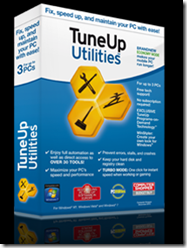
Survey sebuah perusahaan software - dalam website-nya - diungkapkan bahwa software Downloader seri Internet Download Manager (IDM) dan TuneUp Utilities (TU) termasuk 5 besar software terbanyak yang diunduh di internet.

Trend Downloader IDM dan TuneUP Utilities | website files

Saya termasuk user loyal IDM & TuneUp Utilities, mulai dari penggunaan TuneUp 2008, lalu migrasi ke TU 2009, TuneUp Utilities 2010, lanjut ke TuneUp 2011, TU 2012 hingga TuneUp 2013 saat update post ini.

Jika Anda pakai TuneUp Utilities 2011, jangan di-update, karena TU 2011 akan meminta key number baru.

Anda Netter maniak download? Software apa yang digunakan? Saya harap bukan software downloader bawaan browser apapun karena pasti lambat performance. Speed download paling belasan KB/detik atau lebih rendah. Sebaiknya pilih Software downloader yang mana? Pilih IDM yang terbukti handal.

Saya telah memakai Internet Download Manager sejak 2009, karena simple mudah digunakan. Inilah downloader paling favorit di internet berdasarkan survey secara global. Ikuti saja mainstream!!!

IDM 6.07 Final Build 12 Full Version - arsip website

Saya ingin share IDM versi 6.07 Final Build 12 Full Version. Bagi peminat download IDM 6.07 Final Build 12 Full Version, silahkan ke link ini : FREE!!!
- IDM 6.07 Final Build 12 Setup : Download
- IDM 6.07 Final Build 12 Patch / Keygen / Crack / Serial Number.


Cara Install Download IDM versi 6.07
  1. Disconnect dari Internet (offline)
  2. Jalankan KeyPatch
  3. Pilih "Clear Previous registration data""
  4. Pilih "Patch Server Check" -
    Lalu pilih "IDMan.exe" yang baru saja Anda Download (nama file : idman607 – 4,36 MB)
  5. Klik RUN. Ikuti proses install
  6. Selesai install akan muncul halaman Utama IDM, pada menu Task Bar pilih Registration.

    Jika ada perintah registrasi online pilih NO

  7. Pada Menu REGISTRATION – klik “Registration”
  8. Isikan Datanya :

        First Name   : ………  (sembarangan terserah isian Anda)
        Last Name  :  ………  (sembarangan)
        Email           :  ………   (sembarangan).
  9. COPY dan PASTE saja nomor serial dari KeyPatch yang terbentuk di bagian bawahnya.
  10. SELESAI ----   Lakukan hal sama bila terjadi Fake Serial Number karena ter-update.
Sebelum install Patch IDM 6.07 Final,  Anda disable dulu antivirus yang sedang berjalan.

Solusi SN IDM kena blokir atau Fake Serial Number
Kali ini berbagi tip mengatasi SN IDM kena blok atau fake serial number. Pernah mengalaminya? Bagaimana IDM kena blok atau fake SN bisa aktif lagi?

SOLUSI :
  1. Buka C:\WINDOWS\system32\drivers\etc
    Terlihat file host. Silahkan klik kanan dan buka dengan Notepad text-editor.
  2. Setelah file terbuka, tambahkan dibawah ini,  taruh tepat dibawah kata 127.0.0.1 local host.
  3. Klik SAVE
  4. Klik kanan pada file host. Pilih properties, Centang Read only. Klik OK
  5. SELESAI. Silahkan buka IDM.
Jika masih muncul notasi box, isi saja data (boleh sembarang data asal jangan lupa serial number)
Untuk serial number, lihatlah list ini : (pilih salah satu)

  • 3J5U-8U66N-D0B9M-54SLM
    EC0Q6-QN7UH-5S3JB-YZMEK
    GZLJY-X50S3-0S20D-NFRF9

Setelah data terisi semua, maka akan hilang sendiri, dan IDM sudah bisa digunakan kembali.

TU 2012 + Serial Number - arsip website

Untuk TuneUp Utilities 2012 terbaru + Serial Number, silahkan klik link ini :

TuneUp-2012 in website design


TuneUp Utilities 2012 Installer : Download
TuneUp Utilities 2012 Serial Number : Download
Penjelasan fitur-fitur ditawarkan, SILAHKAN klik :


Selamat mengunduh!!!


read more website design

29 April 2012

Free IDM 6.07 Final Build 12 Full Version - website files


Jika hobby Anda download apa saja di internet maka aplikasi Internet Download Manager bisa menjadi pilihan favorit. Tapi jika IDM Anda tidak ASLI pasti repot jika harus mencari crack, keygen atau SN-nya. Saya ingin share IDM versi 6.07 Final Build 12 Full Version lengkap dengan SN.

Internet download manager favorite

IDM 6.07 Final Build 12 Full Version - website archives

Langsung saja menuju link ini :

- IDM 6.07 Final Build 12 Setup : Download

Prosedur Download IDM versi 6.07 :

  1. Disconnect dari Internet (offline)
  2. Jalankan KeyPatch
  3. Pilih "Clear Previous registration data"
  4. Pilih "Patch Server Check" - Lalu pilih "IDMan.exe" yang baru saja Anda Download (nama file : idman607 – 4,36 MB)
  5. Lalu klik RUN dan ikuti proses install-nya
  6. Selesai install, muncul halaman Utama IDM, pada menu Task Bar pilih Registration.

    Jika ada perintah registrasi online pilih NO

  7. Pada Menu REGISTRATION – klik “Registration”
  8. Isikan Datanya :

        First Name   : ………  (terserah isian Anda)
        Last Name  :  ………  (terserah isian Anda)
        Email           :  Terserah Anda 
        Serial     : COPY & PASTE saja SN dari KeyPatch yang terbentuk di bagian bawahnya.
        Selesai 
----   Lakukan hal yang sama bila terjadi Fake Serial Number karena ter-Update.

CATATAN :
Sebelum install Patch IDM 6.07 Final, Anda disable dahulu antivirus yang Running.

Solusi Serial Number kena blok (Fake SN) pada IDM - arsip website

Saya juga ingin sharing tip mengatasi SN Internet Download Manager kena blok atau Fake Serial Number. Pernahkah Anda mengalaminya?  Saya pernah mengalami dan bisa diatasi dengan tips ini.

Bagaimana agar IDM kena blok atau fake SN bisa aktif lagi?

  1. Buka C:\WINDOWS\system32\drivers\etc , Pilih file host lalu Open with Notepad.
  2. Setelah terbuka, tambahkan daftar ini. Letakkan tepat dibawah kata 127.0.0.1 local host.

  3. Disimpan atau klik SAVE
  4. Klik kanan file host. Pilih properties, beri tanda check pada Read only dan klik OK
  5. Jika sudah selesai, silahkan buka IDM Anda.
  6. Jika masih muncul, isi saja datanya (boleh isi sembarangan) kecuali Serial Numbernya.


Untuk SN, pilih salah satu dari list ini :

3J5U-8U66N-D0B9M-54SLM
EC0Q6-QN7UH-5S3JB-YZMEK
GZLJY-X50S3-0S20D-NFRF9

Setelah semua data diisi maka akan hilang sendiri dan IDM sudah bisa digunakan kembali.


read more website design

22 Januari 2012

Download di Filesonic via Internet Download Manager| website file

Free Internet Download Manager - website archives

  1. Make sure you are using the latest version of IDM. Please use "Help->Quick Update" IDM main menu item to get the latest version of IDM installed or download it from our site.

  2. If you have a premium account on Filesonic site :

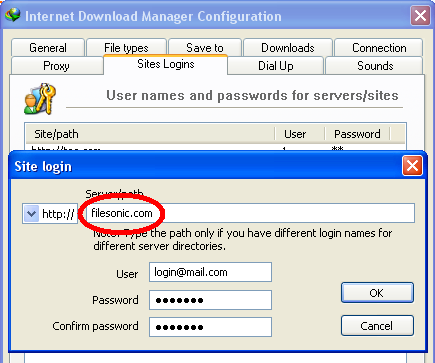
    1. You need to add login and password for this site in "Options->Sites Logins" IDM dialog

      IDM filesonic_opt
    2. Please note that in some cases downloads which have been started in old versions of IDM (earlier than 5.19), may not be able to finish. Unfortunately you will need to delete such downloads and add them again in a new version of IDM.

    3. Also maybe your premium account has expired. When IDM starts downloading HTML files, you need to try to log in to your account and check that everything is in order. Also you can try to download a file with a browser. IDM should not catch the download, and you should see a web page with the explanation of this problem.

    4. Please do not use & and # characters or other special characters in your password. If you use them, log in to Filesonic site and change your password so that it contains neither # nor & characters.

  3. If you have free account on Filesonic site :

    1. Don't try to download Filesonic files directly from other sites via browser context menu :

      IDM via filesonic
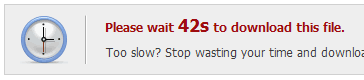
      You need to click the link to go through Filesonic site and get the real download link there. At first you need to wait the necessary time :

      filesonic1 internet download manager
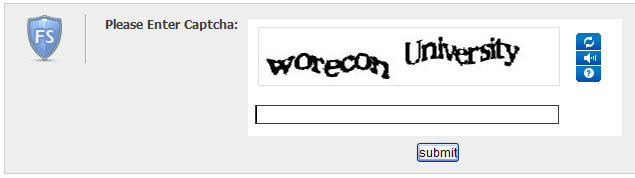
      Then enter and submit the security code :

      filesonic2 internet download manager
      And finally get the real download link :

      filesonic-start IDM
    2. It is important! Trial account settings on Filesonic do not allow requesting the same file twice. The browser made the first request of the file and then when IDM tried to request the same file again, the site sent a web page to IDM instead of the download.

      If you use IE or Mozilla Firefox, now you need to use browser's "Download with IDM" context menu item :


      To take over this download from other browsers you can set a special key in "IDM Options->General->Keys...". Note that "Ins" key should work for most browsers.

      When you will enter a security code and get the real download link, you need to press and hold this key while clicking on download link so that IDM could take over the download before the first browser request.

    3. You need to enable "Start downloading immediately while displaying 'Download file info' dialogoption in "Options->Downloads" dialog (if it is disabled). When downloaded is started, please don't pause it. Don't use "Start Download Later" button on "Start Download Info" dialog.

  4. Also if you use FireFox problems may happen if you use extensions from third party companies to transfer download in IDM, for example Flashgot. IDM can perfectly detect downloads itself but if you really want to use Flashgot, at least update it to the latest version.


    Internet Download Manager, Tonec Inc. 641 Lexington Avenue, 15th fl. New York, NY, 10022 E-mail: info@tonec[DOT]com
    source :

    www.internetdownloadmanager[DOT]com/support/filesonic_dwnl[DOT]html


read more website design
Penelusuran topik khusus di blog ini
Loading